Blog · punch and roll · editing · home studio
Punch and roll without the volume jump
A re-recorded line should sound like it was always there. AudLit measures the audio around a punch-in and sets the new section to the same level, so the fix does not stand out.
Hugh Sung ·
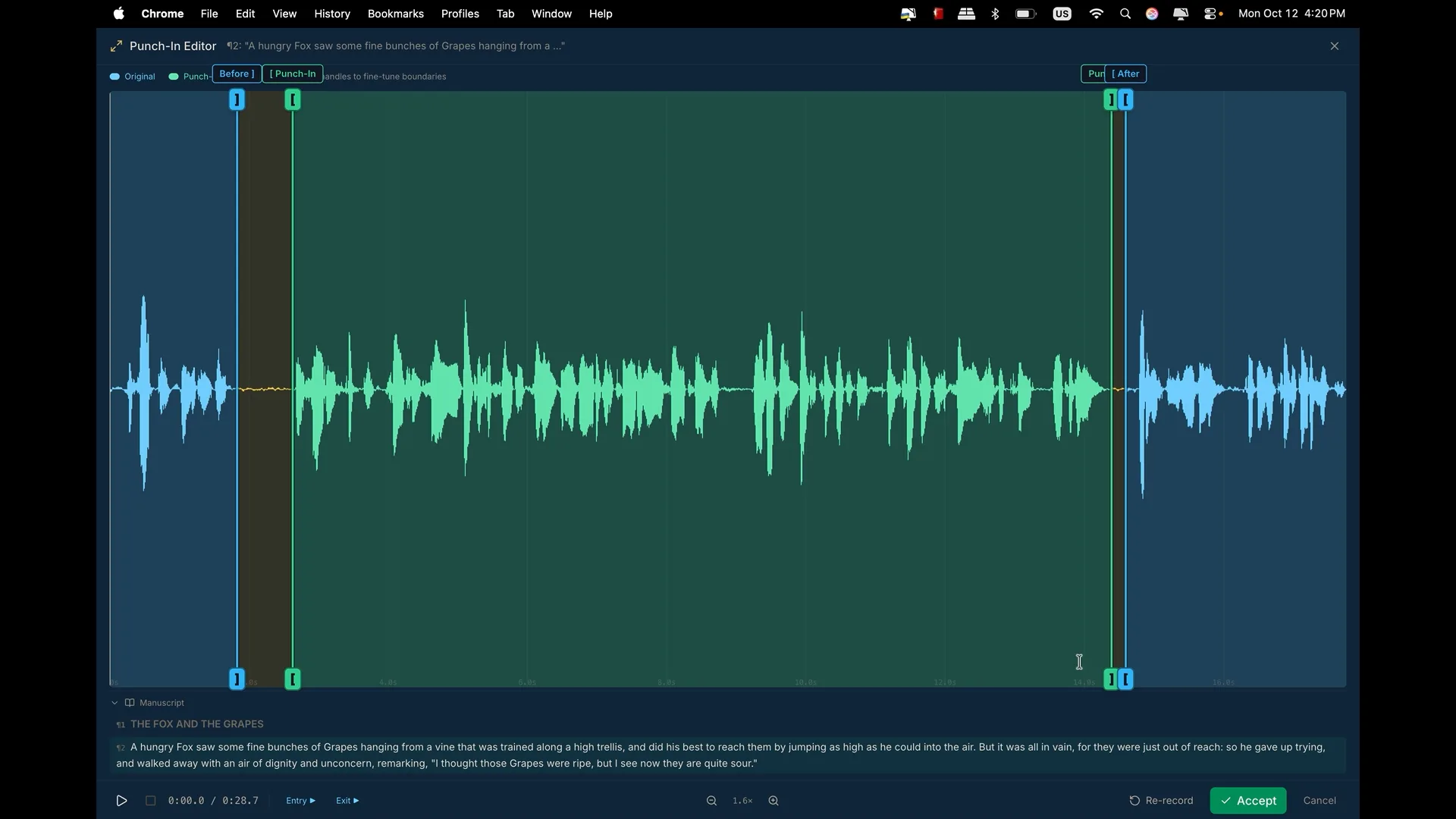
Every narrator knows the moment. You catch a flubbed line, you punch in, you read it again beautifully, and then on playback the fix jumps out. It is a little louder than the sentence before it, or a little quieter than the one after. The words are right and the seam is obvious.
That jump is not a performance problem. It is a level problem, and it is one AudLit now handles for you.
Why mastering cannot fix it
It is tempting to think mastering will smooth it over at the end. It will not. Mastering brings a chapter to its target loudness by moving the whole file by one amount. A punch-in that went in two decibels quieter than the take around it is still two decibels quieter after mastering, no matter how many times you master it.
So the fix has to happen where the problem starts: at the splice.
What AudLit does at the splice
When you punch and roll with Punch-In, AudLit plays you a pre-roll, you read the passage, and you preview the join before anything is committed. On that preview, AudLit:
- Measures the loudness of your original audio on either side of the splice, about thirty seconds each way. Pauses and room tone do not count toward the measurement, only your voice.
- Measures your new take the same way.
- Raises or lowers the new take so it sits at the same level as its surroundings.
The section you are replacing is deliberately left out of the measurement. You might be re-recording it precisely because it came out at the wrong level.
The preview shows a Match level to the audio around it switch, on by default, along with how many decibels it raised or lowered your new take. Turn it off and the re-recording plays exactly as you recorded it. Nothing is final until you press Accept Splice.
Where it stops
Level matching is careful about how far it will go:
- If the new take is already within about a decibel of its surroundings, it is left alone. That is roughly the smallest change a listener notices.
- It moves a take by at most 10 dB either way. A bigger gap usually means something else is going on, such as music or another voice in the audio around the splice, or a real fault in the take. Moving part of the way is still better than not at all.
- It never raises a take so far that it would clip.
If it could only match part of the difference, the preview tells you so and suggests the real fix: re-record at the same mic distance and input gain as the original.
The part that is still you
Level matching fixes volume. It does not fix tone. A line recorded with your mouth farther from the mic sounds thinner and roomier even at the same loudness, and no amount of gain changes that. A few habits make punch and roll seamless:
- Keep your mic distance consistent. Mark your position if you move around between sessions.
- Leave the input gain alone once a book is underway.
- Listen to the pre-roll before you read. It is there so you can match your energy and pace, not only your level.
Do those, and level matching handles the rest, so the fix blends into the take around it.
If you are new to Punch-In, the Fix & Edit section of the narrator's guide walks through it step by step, including the bracket handles for fine-tuning a join.