Blog · mastering · acx · noise floor
Mastering for ACX in one click, and seeing what it changed
Master for ACX (automatic) masters a chapter with your settings, and if only the noise floor fails, tries the smallest fix first and stops at the first version that passes.
Hugh Sung ·
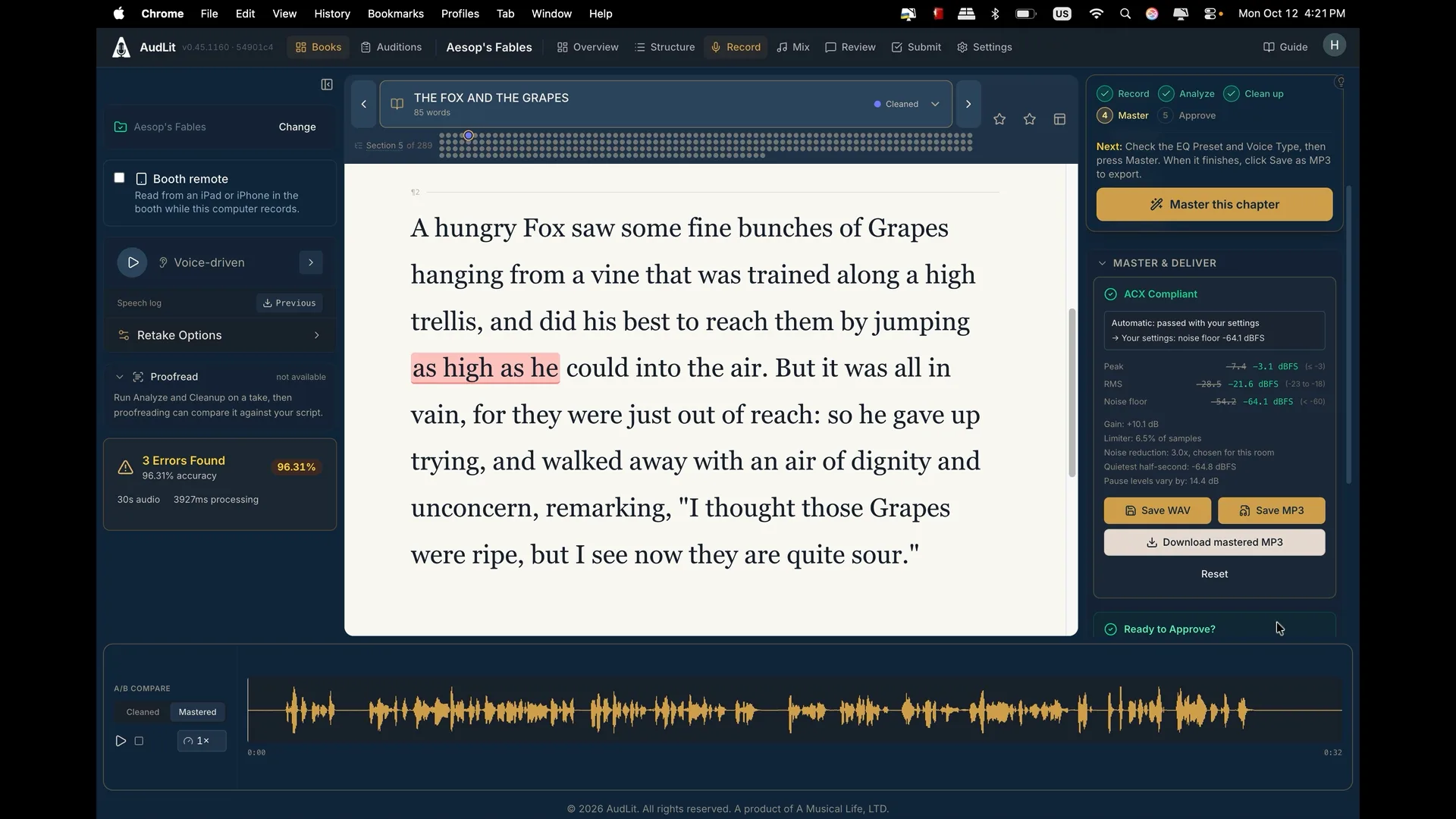
ACX checks three numbers on every file you upload: peak, loudness (RMS) and the noise floor. Peak and loudness are mastering's job and are rarely the problem. The noise floor is where home-studio chapters usually come up short.
AudLit's mastering panel has a button for exactly that case: Master for ACX (automatic).
What ACX is measuring
The three measurements, plus the file format ACX takes:
- Peak: no higher than -3 dBFS
- RMS: between -23 and -18 dBFS
- Noise floor: below -60 dB
- Delivery: 192 kbps constant bit rate MP3
What the button does
It starts the way the regular Master button does: it masters the chapter with your book's own settings. If that passes, you are done, and the result is exactly what a manual master would have given you.
If the only thing that fails is the noise floor, it tries the next-cheapest fix, one at a time, and stops at the first version that passes:
- A slightly quieter level. ACX accepts a range of loudness, and a master at the quieter end of that range has a quieter floor for free. It stays inside ACX's range.
- Quieter short pauses. The noise gate normally stays open through the short pauses between phrases, to protect the ends and starts of your words. This step turns down the middle of those pauses too, leaving the edges of your words alone. Edited chapters, whose pauses cleanup has shortened, often need exactly this. Newer projects have it on already, so the button skips it there.
- Stronger noise reduction, a step at a time, so it never uses more than the chapter needs. If a step barely lowers the floor, it stops there: what is left is not steady background noise, and more reduction would only cost your voice.
When it is done, the result lists every attempt and what each one used. You see what it changed instead of having to trust it.
Nothing changes behind your back
The automatic button never rewrites your book's settings by itself. If it had to change something to pass, it offers a button to use those settings for the rest of the book. Say yes and every chapter you master from then on uses them. Say no and your settings stay as they were.
If nothing passes, it does not pretend otherwise. It keeps the attempt with the quietest floor and explains why the chapter still fails, the same way a manual master does.
When the room is the problem
Processing can only take a noise floor so far. If a chapter still fails, the most effective fix is usually physical: get closer to the microphone. Halving your mic distance buys roughly 6 dB of separation between your voice and the room. Turning the preamp up does not help, because it lifts your voice and the room together.
The Master & Deliver section of the narrator's guide covers the full mastering panel, the compliance report, and the book-wide settings under Settings, Mastering.